Guilds are player-formed organizations composed of players that gain certain in-game features, such as special guild chat channels and shared bank storage. Guilds form for a variety of reasons. Casual guilds are usually formed to simply enhance the social nature of the game and perhaps to offer help to players in need, while other guilds may form to focus on a particular type of content, such as Skirmishes, Dungeon Delves, or player-vs-player. Roleplaying guilds form to bring players together who enjoy roleplaying their characters. Different guilds can band together to form an Alliance with up to 13 member guilds.
List of Active Guilds
1-9
- 1733 [PC]
A
- Alwayswinter [PS4]
- Appaloosa Gang
- ASBO
- Ascent [PS4]
- Axios
- ASYLUM
- ANAT0LIA
- ApeX Alliance [PS4] Recruiting
- AisForAwsum [XBOX]
- Amigos do Bolo
- Anarchy Circus
- The Arcadians [XBOX] - https://www.arcadiansguild.com/
- Arch Of Chaos
- Army of LODIS GH11 [XBOX] Recruiting
- Asatru Kindred [XBOX] Recruiting
B
- Beluga Aérea [PC] Recruiting
- Bahamut Inquisition [PS4] Recruiting
- Bankers United: The Iron Bank & The Platinum Bank
- Bards of the Underdark [PS4] Recruiting
- Beautiful Chaos [XBOX] Recruiting
- The Brothers Grim [PS4] Recruiting
- THE BAR [XBOX]
- Beholder Zombie [PC]
- Besser Du als Ich [PC] German
- BlackDawn [PS4]
- Black Vanguard [PC]
- Black Lotus [PC]
- The Black Coffin Founder: BackSurgeon
- Blood of the First Men [PC] Recruiting
- Bloodrage [PS4]
- BlueBlood [XBOX]
- The BOoRK of the HBI [XBOX]
- Bright Bldes [PC] English
- Brotherhood of Light [PS4]
- The Brotherhood of Mann
- BrulParra [PC]
- Badbreeds [PS4]
- Beards N Beauties [XBOX] Any lvl, Recruiting
C
- Casual Adventurer's League [PC] English, casual, any level, recruiting
- Chronic Legion [PC] English, No Requirements
- Celestial [PC]
- Company Of The Blood Moon [XBOX]
- Clan Helgard
- COLD ZERO [PC]
- Convocation of the Ents
- Chains of Ouroboros [PS4] English, casual, any lvl, currently recruiting
- Chaos Incorporated
- Chaos United
- Cult of Mattachine [PC] [FAQ]
- Casual Dailies [XBOX]
- Choas Lords [PS4]
- Commanthor Sentinels [PC] English, casual, any lvl, Mod 16, recruiting
- The Crimson Orchids [PS4] English, Recruiting [Apply]
- Cryptic Souls
- Crit Thy Pants [XBOX] any lvl new guild
- Cult of Neverwinter [XBOX]
- Cult of Cthulhu [PS4]
D
- ф D e i t y ф PT-BR | PT-PT
- DeathBlow [PS4] English, casual, currently recruiting
- Death Plague
- Demonic Nightmare
- The Dawn
- The Darkness
- Dead Drop [PS4]
- Dead to Rights
- Dept. of Human Resources [XBOX] [Recruiting]
- Diz Corp
- Demoni e Angeli [PC] Italians
- The Defenders Of Eternal Summer
- Dracolich [PS4] Recruiting
- DRAGONSFURY [XBOX]
- Dragon Age [XBOX]
- Dragon Knights Of Kelmdalar [PC] Recruiting
- DRAGOON ELITE [XBOX] Recruiting
- Drunken Demons [XBOX]
- Disciples of Lodis GH8 [XBOX] Recruiting
- DuhThunderFux [XBOX] Recruiting
E
- Elders of Neverwinter [PC] Recruiting
- Elemental Evil
- Elite 187
- Élite Mercenaria Hispanic/Hispanico
- Epic Avatars [PS4] Hispano / Latino / Español / Spanish
- Essence of Aggression
- Exalted With McDonalds [XBOX]
- Executive Outcomes Mercenary Company [PC] Currently Recruiting - Click here to join us on Discord
- Exodus Souls [PS4]
- Exterminatus [PS4]
- Eye of the World [PS4] Recruiting
F
- Fair Dinkum 2.0 [PC] AUS
- Fate of the Fallen [XBOX] Level 20 guild with full boons and a 11k IL requirement
- Final Night .chaos united
- FINITIV [PS4]
- Forjados para Guerra [PS4/Brasil]
- Forsaken souls website [PC]
- The Forsworn Tribe
- Freaks and Geeks
- FrightKnights
- Flawless Outcasts [PS4]
- FurbyGooch [PS4]
G
- Gallifreyan Keep
- Galvin's Knights
- Gaming Geeks
- La Garde Noire [XBOX]
- GNE (Greatest Newbs Ever)
- Gods of Neverwinter Founder: Khensu Blackblood
- Gods Of Silence [XBOX] Founders: Dr Puggle & SumQuodSum65 English Recruiting
- Gonevil
- Good Time Gamers [XBOX]
- The Great Realm of Bacon The GRoB Facebook Page
- Greycloaks
- Grimm Crimson [PC] Recruiting
- Grimm Crimson II [PC] Recruiting
- Grim Reapers
- Guardians of the Grand Hall
- Guild of the Golden Grimoire
H
- Heralds of Lurid Dusk [PC] English
- H420ppy Inc. [PC] LSDMT Alliance
- Heroes of Forgotten Realms [PS4] English / spanish / Leader: Marco Aurelious Caio
- Horde House [PS4]
- House Mormont
- HozenBros [XBOX]
- Hungarian Knights Active since 2013
- Hungarian Lords
- Hunter's Dream [PS4] Recruiting
- Hunters of Milfs
- Hells Angel
- H3llsWarriors
- Die Hüter des Lichts [PC] Germany / Leader: Elijah Windemear@kirawindemear
- House Whitethorne [PS4]
I
- Imperium [PC] See for yourself who we are and what we are all about! You can find us on our Discord - 24/7 - Click here https://discord.gg/rRFpDsF
- Infernal Paragons [PC] (site)
- Injustice League [PS4] All Players of All Levels welcome. Chill,Friendly,Easy Going,Laid Back environemnt. Alliance wide games & Giveaways
- Insane Asylum
- The Imperial Guard
- Ishgard EU/EN
- Inappropriately Feytouched [PC] Recruiting
- Irmandade de Sangue [PS4] Recrutando
- Icewind Dale and Chill
- Immortal Empire [PS4] EST English Leader Siren@ogsnipersiren Website
J
- JOVI [PS4] The only unofficial Bon Jovi guild in Neverwinter
K
- Kekskomplott [PC] German, Suchen Member (@mutzelichan, @calli1233)
- Kesatria Republik Lama [PS4]
- Killers Only Recruiting
- Kingdom of Deception [PS4] Recruiting
- Kingdom of Valhalla [PS4]
- Kingsman Gaming
- Knights of Empire
- KNIGHTS OF LODIS [XBOX] GH20 - Recruiting
- Knights of Lordaëron [PC] Recruiting
- Knights of the Grove [PS4] Recruiting
- Knights of the Mythical circle
- Knights of the New Order [PS4] Recruiting, Friendly, Fun, Family Gaming Environment
- Knights who say nee
L
- Lords of The Nine [XBOX]
- Legacy of the Vanguard
- LEGION OF GOD SLAYERS [XBOX]
- Legion of Gamers [XBOX]
- Limitless [PC] English, Casual
- Linkdead Often [PC] English, Casualt - new guild. All players welcome
- LostWrath English, Casual, Currently Recruiting
- L'Ordine del Chaos [XBOX]
- Lowered Expectations [XBOX]
- League of Assassins [PS4] Recruiting
- Lock City [XBOX]
- Los Angeles Caidos[XBOX]
M
- Midnight Bayou [PS4] Recruiting (Class Training for End Game Content, Alliance Giveaways & Raffles) Facebook
- Mystra's Embrace
- Mythic Nightmares [PS4]
- Mythweavers
- Guild MVP [PS4] (stands for Most Valuable Player)
- M-O-O-N [PC] Recruiting, PVE, discord, English, EST, casual
- Midnight Express [PC]
- Militibus Ex Familia [PC] All players welcome, Wholesome family environment
N
- Neverwinter's Legends [PS4]
- Neverwinter Order [PC] Italian, recruting, Ts
- Night Walkers [XBOX]
- Nightswatch [PC]
- Nikostratos Since May 2013
- No Man's Realm [PS4]
- Not My Day Job [PC]
- Nords of Neverwinter [PC]
O
- On Fridays We Wear Pink
- Order of the Golden Lion
- Order of the Crimson Blades
- Oblivion Order [PS4]
- Order of Knights Radiant [PC]
- Order of the Pandora Knights Any level players
P
- Pain Train [XBOX]
- Poison Clan [XBOX]
- Pigs Lurking in Shadows
- Proteus
- Padlí andělé CZ-SK
- Passt scho
Q
R
- Reapers Of Hell [PS4] Actively Recruiting on pS4
- Raechend Revolte
- Reborn Immortals
- Reckless Rejects Mercenary guild
- Red Dawn [PS4] Recruiting Have PS4 Community Page
- RedXOasis
- Renegados_BR [PS4] Recruiting
- Ride or Die [PS4]
- Rise from the Ashes [XBOX] Recruiting - McGinny86
- RISING EMBERS [XBOX] Recruiting
- Risingstar
- ROYAL [PS4] Recruiting
- Royal Black Watch
- Recon 315 Upcoming guild. Now recruiting players. <Now looking for Alliance guilds>
S
- Stalwart Brotherhood [PS4] -Please view our Community on Ps4-Discord-
- Sacred Convergence English, Casual, Currently Recruiting Guilds for our Alliance
- Scattered Empire
- Swole Patrol
- Shadows of Faerûn [PS4]
- Soul Reavers
- Sick Empire [PS4] - Watch the team at work
- ServerNotResponding
- Seven Deadliest Sins [PS4]
- Seventh Sactum
- Shadows of Rome
- Swexy Knights [PS4]
- Shadows of the Lost Age
- Shava's Guild of Mercenaries Follow us on Facebook
- Slayers of Death
- Sleepless Knights [XBOX]
- Storm Hear
- StormLight [XBOX]
- SecretCiti Templars
- Stingers Rage
- Sparrow xkillersx [PS4]
- Skeleton Inquisition [PS4]
- The Sword Coast Knights [PC]
- Sightless Embers [PS4] Family Friendly - Recruiting
- The Goonies
- Stalwart Adventurers Inc. [PC]
- Soldiers of Defiance
T
- The Silver Order [PC] Recruiting
- The Emerald Knights [PC] Recruiting
- T.A.C
- Terran Protectors
- That One Guild of Misfits [PS4]
- The Avengers [PS4]
- The Exalted Guard [PS4]
- The Forgotten Company
- The Fearless Rebels Recruiting [PS4]
- The Holy Crusaders Crusaders Alliance
- The Jade Phoenix of Anthalore
- The Knights of Evenwood [PC] Family Friendly, Casual - Recruiting
- The Knights of Ravenloft Recruiting
- The Nation [XBOX]
- The Neverwinter Nine [PS4]
- The Nightmare Court Facebook
- The Never Throne [PS4]
- The Misfit Toys [XBOX] GH 20
- The Pain Train [XBOX] Any level acceptance, mic required Xbox 1, msg DemonKyub gamertag to join
- The Phoenix
- The RNG SCREWED ME [PS4]
- The Tempuran Knights [XBOX]
- The Crimson Riders [PS4]
- The Toon Squad
- The Horde Of The Ethereal Vale [PS4]
- The Death Squad [XBOX] Drunk
- The End Of The Internet [PC] Discord 2/3/2020 Active and recruiting
- Tyrs Paladium Research our Guild here | Apply on our website
- The Wolf Den[PS4] Active, Friendly, Helpful, Social, Family-like Environment.
- Thultanthar Enclave [XBOX]
- TNWO [PC]
- The Dauntless [PS4]
- The Rouge Nation [XBOX] Any level acceptance, mic required Xbox 1, msg Warbrine gamertag to join
- Timed Out [XBOX]
- Thunderfists [PS4] Recruiting
- The Sith Empire [PS4] Recruiting, Friendly, Fun, Family Gaming Environment
- The Reaping Eagles [PC]
U
- Unrepentant
- Unbound
- Unrelenting [XBOX]
- Unicorns of War [XBOX]
- Untamed Mercenaries [XBOX]
V
- Valaraukari Ascension THE BEST
- Villanousity [PC]
- Vagabunden [PC] Infos - German, Family Friendly, no VoiceChat
- Vulgar Display of Power [PS4] Recruiting
W
- Warriors of Chaos [PC]
- West Wind Brigade
- War Wolves [PS4]
- White Lotus [XBOX]
- Wolves of Furor Celtica
- WOOKIE TANGO FOXTROT
- Wayward [PS4]
- We Clear Lobbies
X
- wolf's playground [XBOX] Recruiting
Y
- The Younglings [PS4] Recruiting
Z
- Zeal dragon warriors [Ps4]
Recruiting
Starting a guild
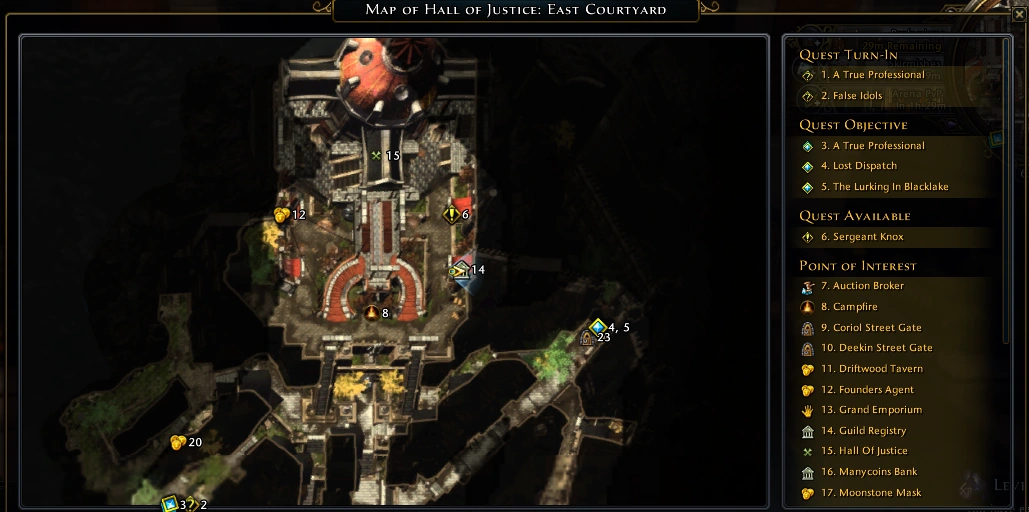

Location of the Guild Registry
In Protector's Enclave, go to the Guild Registry on your map and talk to the Guild Registrar. In order to start a guild in Neverwinter, you need a full party of players not already in a guild that are on the same map. Any member of the party can talk to the guild contact and start the guild with all party members. The player who spoke to the contract will be given the maximum guild rank, and the others with be given the lowest rank. Checklist for starting a guild:
- Full Party – 5 players
- All Members of the Party are on the same instance of Protector's Enclave
- All starting members have to be level 15 or higher
Guild panel window
The guild panel window features many tabs:
- News
- Strongholds
- Events
- Roster
- Information
- Settings
- Alliance
News
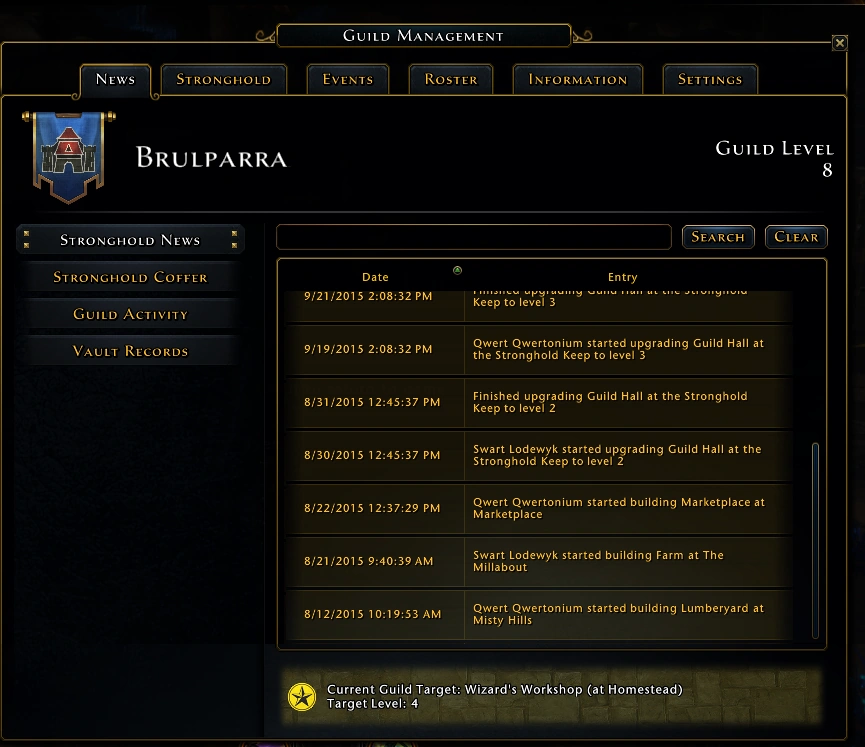

News tab
The news tab has four logs.
- The first one presents the Stronghold News where stronghold based events are displayed(e.g. start and finish of stronghold structures).
- Next we have the log of the Stronghold Coffer
- The third is for the guild events (creation, join, promotion, etc.).
- The last one summarises the log of the guild vault.
Events
The events tab enables allowed members to create and edit events.
Creating an Event
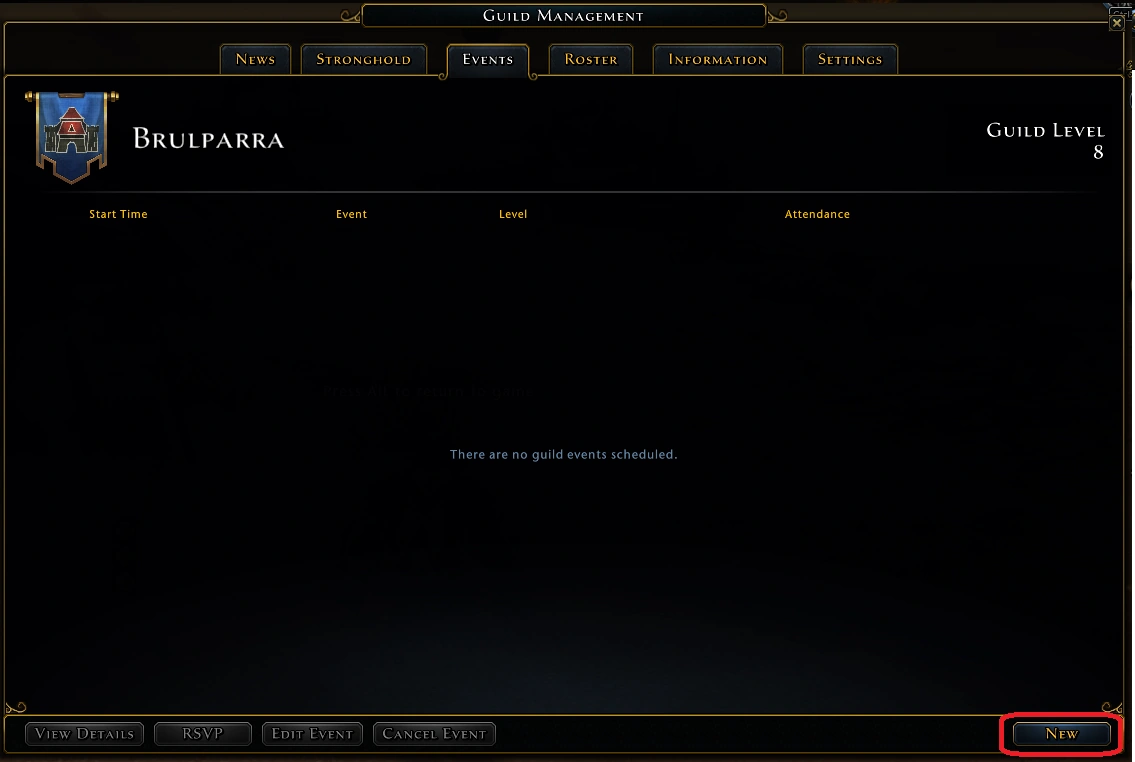

Empty events tab
To create a new guild event you need to click on the new event tab in the right hand corner of the guild events tab
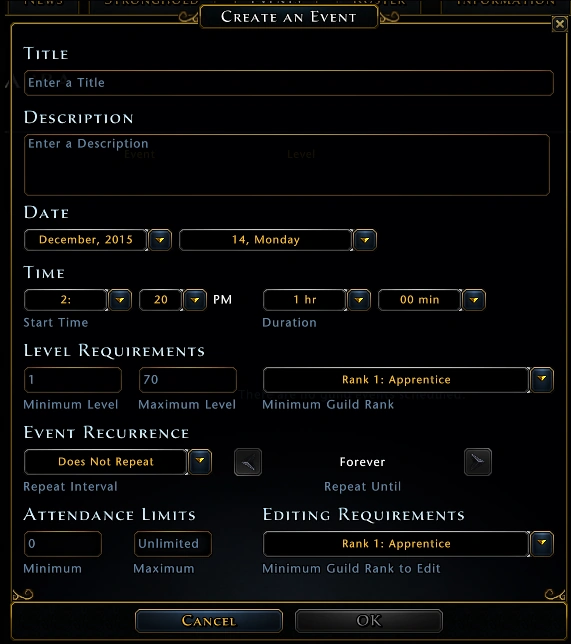

New events form
Once clicked the create a new event form appears. This form requires the following information:
- Title - Title of the Event
- Description - Short Description of the event.
- Date - Date of the event (this will adjust to the players time zone)
- Time - Time of the event (this will adjust to the players time zone)
- Level Requirements - Minimum and maximum level of players as well as minimum guild rank required to participate in the event.
- Event Recurrence - Is this a one-off event or will it repeat.
- Attendance limit - Minimum number of guild members required for this event.
- Minimum Guild Rank Edit - The minimum rank that is allowed to edit this event.
Only players that have the right to create guild events can create events
Viewing Details of an Event
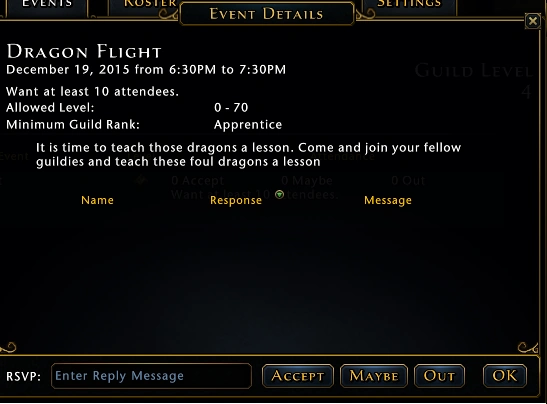

Events Details form
To view details on a event click the view details button in the left bottom of guild events tab.
On this form you can see alist of players that have already RSVP'd for the event. You can also use the section at the bottom to indicate whether you will be joiing in or not.
The options are :
- RSVP - The message you would like to add to your RSVP (e.g. Reason you can't join.)
- Accept/Maybe/Out - Choose whether you will be joining or not.
- OK - Close form without RSVP'ing or altering previous RSVP
Roster
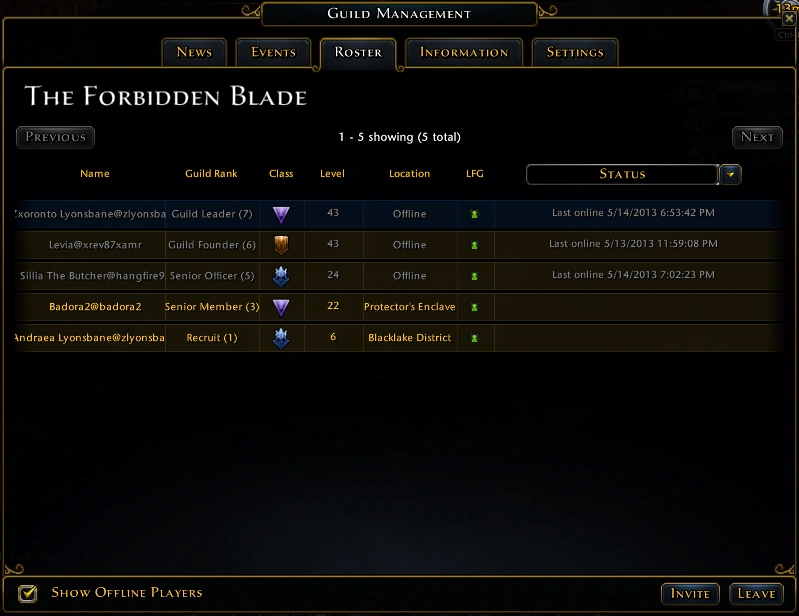

Roster tab
The roster tab gives the full list of guild members, their rank, class, level, location (if online), status and eventual comments.
The members with permissions can set comments, change ranks, kick members, invite members or leave the guild.
Information
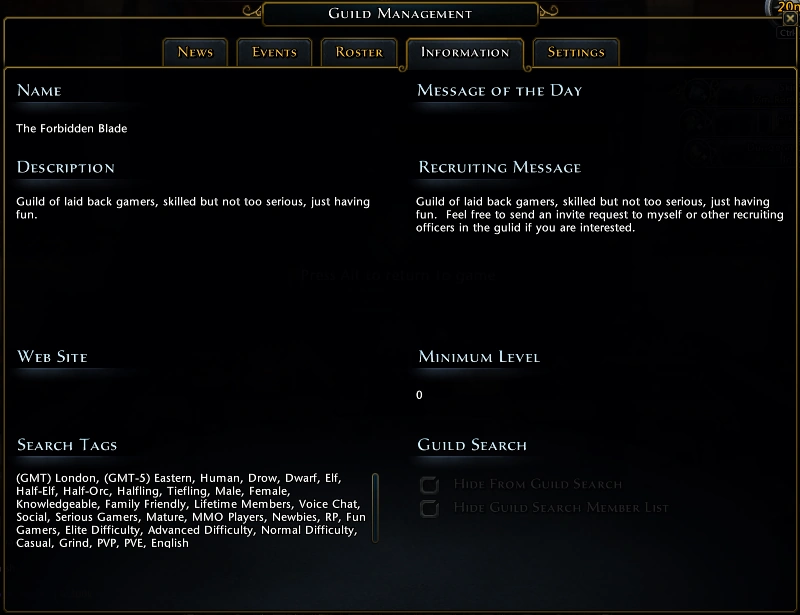

Information tab
Here you can customize your guild's name, message of the day, description, recruiting message, web site, minimum level and search tags.
The search tags are particularly important because players can search for guilds based on the tags you choose.
Settings
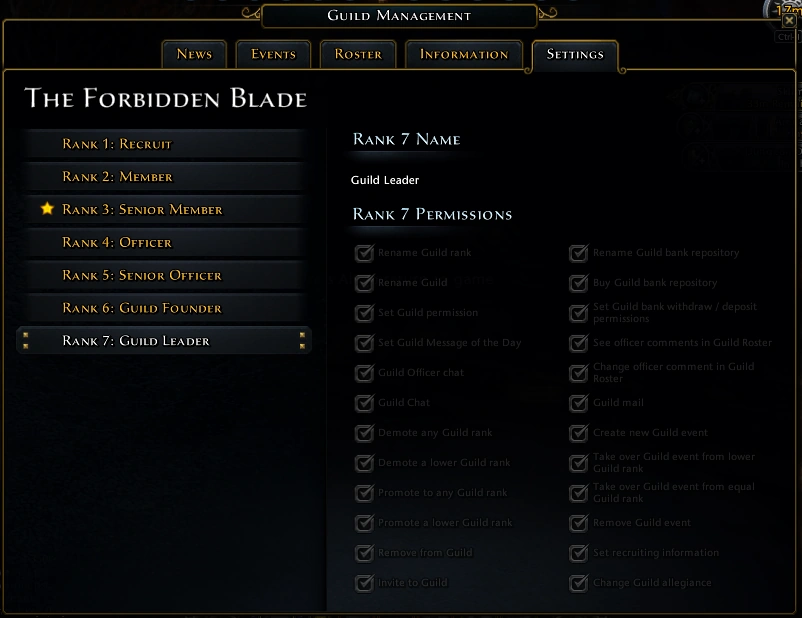

Settings tab
This panel lets you set all the permissions.
Guild bank window
The window of the guild bank that can be accessed in Protector's Enclave ( next to the Guild Registry and at the Manycoins Bank ) or in the Stronghold this window offers several features.
Stash
A guild bank can contain up to 8 depots; each depot contains 48 item slots. Depot 1 can also be used to share gold.
Permissions
Admins can change the depot name here and set permissions for sharing items and gold.
Protocol
All sharing activities (donations and withdrawals) are logged here. Has a search engine.
Depot shop
Depot 1 costs 150,000 AD; depot 8 costs 8 times more.
Deposit 2 costs 300,000 AD
Deposit 3 costs 450,000 AD
Deposit 4 600,000
Deposit 5 750,000
Deposit 6 900,000
Deposit 7 1,050,000
Deposit 8 1,200.000